Guides

In brief
An App Store pre-order puts your app's real product page live 2 to 180 days before launch. How they work, how to set one up, and how to drive pre-orders.
You can spend months building an app, finally launch it on the App Store, and then hear crickets.
An App Store pre-order gives you a way to start building demand before launch day. People can visit your real App Store product page, pre-order the app, and then receive it when your scheduled release date arrives.
For a brand-new app, Apple currently lets you schedule that release from 2 to 180 days after the pre-order is published. On release day, customers are notified and the app automatically downloads to the device they used to place the pre-order.
That can create a nice concentration of downloads around launch day instead of starting from zero.
And this isn't some weird App Store hack. Apple fully supports pre-orders and specifically says pre-order volume can help drive early visibility and contribute to stronger chart placement.
That doesn't guarantee you're going to shoot to the top of the charts. But it can give a new app more momentum right out of the gate.
App Store pre-orders at a glance
App Store pre-order feature | How it works |
|---|---|
Pre-order period | For a brand-new app, the release date can be 2 to 180 days after the pre-order is published. |
App Store product page | Your app gets a real App Store listing before launch and can appear in App Store search. |
App Review | The app must pass App Review before the pre-order listing can be published. |
App completeness | The version submitted for pre-order must already be complete and deliverable. |
Marketing | You can promote the pre-order through social media, your website, email, Apple Ads, and other channels. |
Launch day | Customers are notified when the app is released, and the app can automatically download to their device. |
Analytics | App Store Connect provides data such as net pre-orders, conversion rate, acquisition source, and resulting downloads. |
Eligibility | Free and paid apps can use pre-orders. In-App Purchases and app bundles themselves aren't eligible for pre-order. |
Why run an App Store pre-order?
The biggest benefit is simple: you can bank some of your launch demand before the app actually launches.
Imagine that you run a pre-order campaign for two months and collect 2,000 pre-orders.
Instead of launching on day one with nobody waiting for the app, you already have a group of people ready to receive it.
Customers can cancel a pre-order, so you shouldn't assume that every single pre-order will eventually become a download. But if you build up a meaningful number of pre-orders, you can potentially create a concentrated burst of downloads around launch day.
This is where the launch strategy comes in.
Apple says pre-order volume can contribute to stronger chart placement and early visibility. That doesn't mean 2,000 downloads will automatically put you at number one in your category. Apple doesn't give developers a simple formula like that.
But even temporary visibility can introduce your app to people who never saw any of your pre-launch marketing.
Basically, you're trying to start the flywheel with some momentum instead of pushing it from a dead stop.
How does an App Store pre-order work?
Once your pre-order has been reviewed and published, you have a real App Store product page before the app's release date.
People can visit that page, see your icon, screenshots, description, and other product information, then choose to pre-order instead of downloading immediately.
Pre-order apps are discoverable through App Store search, and Apple provides official pre-order badges that you can use in your marketing materials.
You can link people directly from your website, newsletter, YouTube videos, or social posts to the App Store product page.
That's important because now all the marketing you're doing before launch has somewhere to send people.
Without a pre-order, someone might see your app on TikTok three weeks before launch, think it looks interesting, and then completely forget that it exists.
With a pre-order, they can commit right then.
Your app must already be complete
There is one very important requirement.
Apple's App Review Guidelines (2.3.11) say an app submitted for pre-order must be complete and deliverable when you submit it.
The version you eventually release also shouldn't be materially different from what you advertised during the pre-order period. If something major changes, such as the business model, Apple says you should restart the pre-order.
So don't think of a pre-order as a six-month window where you can upload a half-built prototype and then race to finish it before launch.
Your version 1.0 should be a real, complete app.
You can still keep working during the pre-order period. For example, you might have version 1.0 finished and approved, then use the pre-order window to work on bug fixes or your first update.
The important part is that the app you submit for pre-order needs to stand on its own as a complete product.
Can apps with subscriptions or In-App Purchases use pre-orders?
Yes. Both free and paid apps can be offered for pre-order, including apps that use subscriptions or other In-App Purchases.
The important distinction is that the In-App Purchases themselves aren't eligible for pre-order. Customers are pre-ordering the app, not its subscription or other purchases. You can still set up your In-App Purchases in App Store Connect before and during the pre-order period so they're ready when the app launches.
App bundles aren't eligible for pre-order either.
What happens to pre-orders on launch day?
When the scheduled release date arrives, customers who pre-ordered are notified that the app is available.
The app automatically downloads to the device they used to place the pre-order. It can also download to other eligible devices if the customer has automatic downloads enabled.
For a paid app, customers aren't charged when they initially place the pre-order. They're charged when the app is officially released.
There's also a nice pricing protection for customers. If you change the price of your app during the pre-order period, Apple charges the customer whichever price is lower: the price they agreed to when they pre-ordered or the price on release day.
For most indie developers launching free apps with subscriptions or in-app purchases, the big thing to remember is that the people you've gathered during the pre-order period can become a concentrated batch of downloads around launch day.
That's where the potential launch-day momentum comes from.
How do you get people to pre-order your app?
Setting up a pre-order doesn't magically bring in thousands of people. You still need to drive traffic to the page.
Promote it on social media
For most indie developers, social media is probably the easiest place to start.
That could mean:
YouTube videos
TikTok
Instagram Reels
X posts
Reddit or relevant communities
Your existing email list
Your own website
The big advantage is that you now have a direct App Store link to give people.
Instead of saying, "My app is coming in two months, remember to look for it," you can tell them to pre-order it now.
And before you start sending traffic, make sure the product page itself is good.
Your icon, screenshots, subtitle, description, and positioning still need to convince someone that the app is worth ordering.
Our App Store Optimization guide goes deeper into improving your App Store product page and getting more people to download your app.
Run Apple Ads during the pre-order
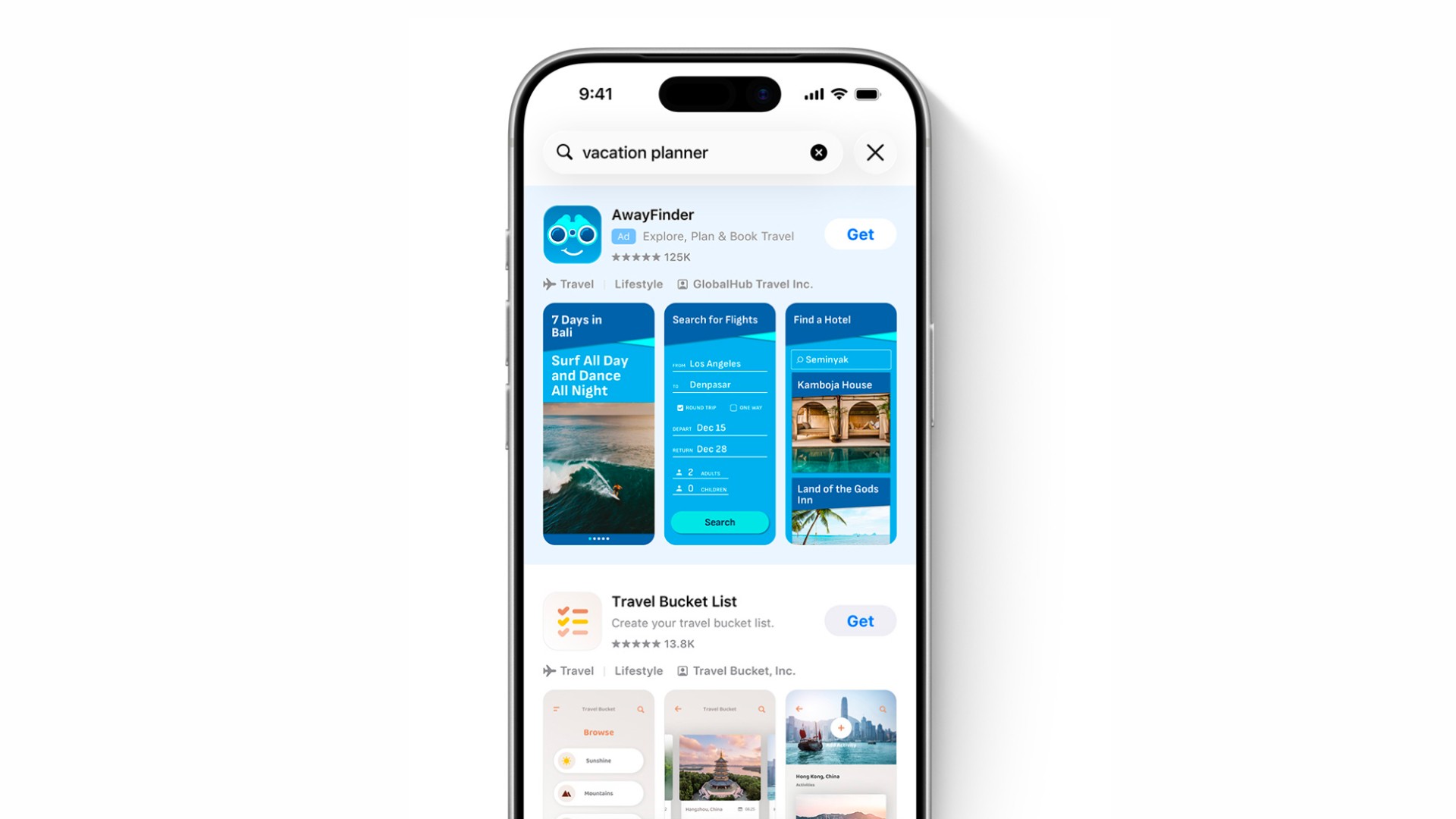
You can also run Apple Ads while your app is available for pre-order.
This is great because somebody is already on the App Store searching for an app just like yours.
If you built a meal-planning app, for example, you could target relevant searches, show up at the top of the search results, and drive those users directly to your pre-order listing.
Your app isn't available to download yet, but the user can still land on the product page and pre-order it.
One important setup detail: Apple recommends using the Manual Bid strategy for pre-order campaigns. Its Maximize Conversions strategy is designed for post-launch campaigns, so save that option for after your app is available to download.
If you're brand new to Apple's ad platform, check out our Apple Ads beginner's guide.
Try other paid promotion
You don't have to limit yourself to the App Store or social media. Depending on your app and audience, you could also test:
Sponsoring a small newsletter in your niche
Paying a relevant creator to demonstrate the app
Google Ads
Other social advertising
I wouldn't spend a bunch of money just because you have a pre-order page.
Start small, see which channels actually produce orders, then put more effort behind what's working.
How to set up an App Store pre-order in App Store Connect
Apple manages pre-orders through the Pricing and Availability section in App Store Connect.
For a brand-new app, the current process is:
Open your app in App Store Connect.
Go to Pricing and Availability.
Scroll to App Availability and choose Set Up Availability.
Select Publish as Pre-Order.
Choose your release date.
For a brand-new app, the release date must fall within Apple's allowed pre-order window.Select the countries or regions where you want the pre-order to be available.
Confirm the pre-order configuration.
Return to your app version and submit the app for App Review (when it's ready).
After approval, the App Store listing goes live as a pre-order and stays that way until your scheduled release date.
For the most current instructions, check Apple's official App Store Connect pre-order documentation.
How to track your App Store pre-orders
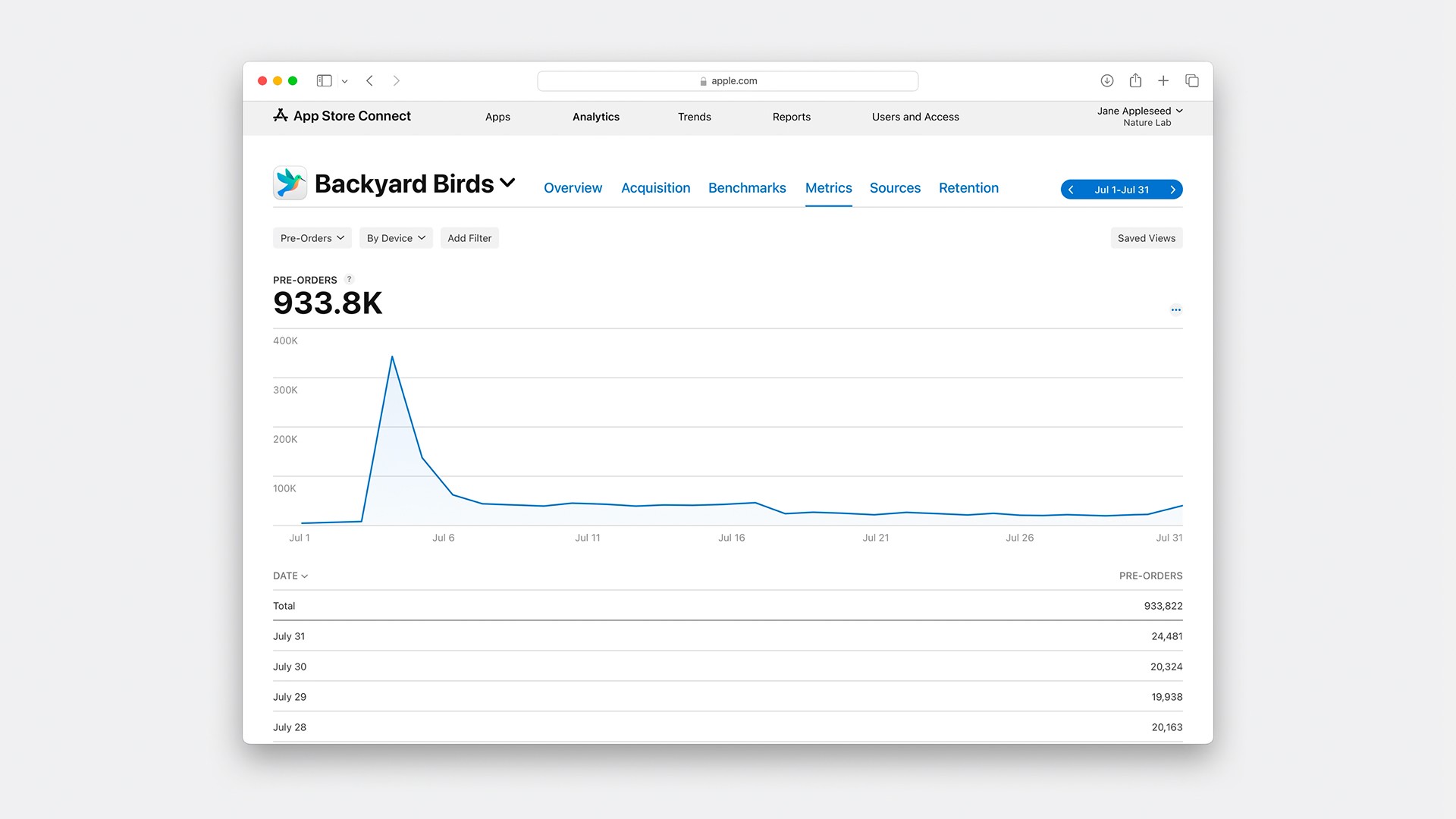
Once people start pre-ordering, App Store Connect gives you data to see how the campaign is performing.
Apple's Pre-Orders analytics can show information such as:
Net pre-orders
Pre-order conversion rate
Downloads resulting from pre-orders
Acquisition source
Territory
Device type
Net pre-orders are useful because customers can cancel before launch.
Go to your app in App Store Connect, open Analytics, and look for the pre-order information available for your app.
This is where things get cool.
Maybe you're getting most of your orders from one country.
Maybe a particular marketing source is outperforming everything else.
Maybe you're getting a lot of traffic to the product page, but hardly anybody is actually pre-ordering.
You can use that information to decide where to spend your remaining marketing time and money before launch.
Apple has a full Pre-Orders analytics guide if you want to dig deeper.
Should you use an App Store pre-order?
A pre-order makes the most sense when you actually have a launch strategy.
Consider using one if:
Your version 1.0 is complete.
You have a specific launch date in mind.
You want a few weeks or months to market the app before release.
You have an audience or marketing channels you can send to the product page.
You want to measure demand before launch.
You want to concentrate as much of your initial demand as possible around release day.
I probably wouldn't delay a finished app for months just so I could say that I ran a pre-order. The pre-order is a tool. You still need a reason for that extra runway.
If your app is finished, nobody knows about it yet, and you aren't planning to do any marketing during the pre-order period, simply waiting isn't going to accomplish anything.
But if you're actively making videos, building an email list, talking about the app on social media, running ads, or partnering with creators, a pre-order gives all that pre-launch attention somewhere useful to go.
Frequently asked questions about App Store pre-orders
How long can an App Store pre-order last?
For a brand-new app that has never been released on the App Store, Apple allows you to schedule the release between 2 and 180 days after the pre-order is published.
There's a longer window for existing apps expanding into new markets. If your app is already available on the App Store and you're offering it for pre-order in a new country or region, the release date can be 2 to 365 days after the pre-order is published in that region.
Can I put an unfinished app up for pre-order?
No.
Apple requires apps submitted for pre-order to be complete and deliverable. The app you eventually release also shouldn't be materially different from what you advertised during the pre-order period.
Can users cancel an App Store pre-order?
Yes.
Customers can cancel pre-orders before release, which is why it's useful to pay attention to net pre-orders in App Store Connect rather than assuming every order will turn into a download.
Can I change my app's release date?
Yes, within Apple's current pre-order restrictions.
If you change the date, make sure you communicate that clearly through your own marketing channels so people waiting for the app know what's happening.
Can I remove an App Store pre-order after it's live?
Yes. You can remove a pre-order from the App Store before the app is released. If you do, customers who pre-ordered won't receive the app, and customers who pre-ordered a paid app won't be charged.
You can make the app available for pre-order again before its scheduled release date. But once that release date has passed, you can't republish the app as a pre-order.
Can I run Apple Ads for an app that hasn't launched yet?
Yes.
Apple supports advertising apps that are currently available for pre-order. This gives you a way to reach people already searching the App Store for apps in your category before your official launch.
Do App Store pre-orders guarantee a higher ranking?
No.
Apple says pre-order volume can contribute to stronger chart placement and early visibility, but there is no guaranteed number of pre-orders or downloads that will produce a particular App Store ranking.
Treat the launch-day spike as an opportunity for additional exposure, not a guaranteed result.
The bottom line
An App Store pre-order lets you start collecting demand before your app launches instead of waiting until release day to find your first users.
Get version 1.0 finished, put the pre-order through App Review, give yourself a realistic marketing window, and start sending people to the product page.
Then use App Store Connect Analytics to see which channels and regions are actually generating orders.
When release day arrives, those pre-orders can turn into a very nice spike in downloads and give your app a strong start.
Try Bitrig
When you're ready to ship, Bitrig builds native Swift and SwiftUI apps with AI and handles the App Store Connect side, including creating your app record, uploading builds, setting your release date, and submitting for review.
Topics
App Store
Marketing
Publishing

