Guides

In brief
App Store Connect is Apple’s hub for publishing and managing apps. App Review, TestFlight, purchases, analytics, reviews, and updates explained for beginners.
You finished building your app in Xcode, Bitrig, or another tool. You’ve tested it, fixed the obvious bugs, and polished the interface.
Now, how do you actually get it onto the App Store?
That’s where App Store Connect comes in.
App Store Connect helps you take an app from a finished build to a real product that people can discover, download, review, and purchase. You’ll use it for your first launch, but you’ll keep coming back whenever you release an update, add a subscription, check your sales, run a beta test, or respond to a customer.
What is App Store Connect?
App Store Connect is Apple’s web-based service for managing apps distributed through the App Store.
It doesn’t replace Xcode or Bitrig. Those are tools you use to build, run, and test your app. App Store Connect manages the distribution and business side of the app.
To publish an app, you’ll need a paid Apple Developer Program membership. As of 2026, the standard membership costs $99 per year in the U.S. There’s no separate App Store Connect subscription fee on top of that membership.
You can learn more about what the membership includes in our guide to the Apple Developer Program.
What can you do in App Store Connect?
App Store Connect covers almost every part of running an app business once you’re preparing to distribute your app.
You can use it to:
Create and update your App Store product page
Upload and manage app builds
Submit apps and updates to App Review
Choose where and when your app is released
Run beta tests with TestFlight
Create subscriptions and in-app purchases
Set prices and availability
View downloads, sales, proceeds, and engagement
Read and respond to customer reviews
Manage team members and permissions
Complete agreements, tax forms, and banking information
Let’s look at the parts new developers are most likely to use.
Create your App Store product page
Your product page is the public listing people see when they discover your app on the App Store. Most of the information on that page is entered through App Store Connect, including:
App name
Subtitle
Description
Keywords
Category
Screenshots and app previews
Support and marketing URLs
Privacy information
Age rating
Promotional text
Version release notes
Every part of this page can affect whether someone downloads your app. Your screenshots, icon, title, subtitle, description, ratings, and pricing all help users decide whether the app looks relevant and trustworthy.
You can learn how to improve these elements in our beginner’s guide to App Store Optimization.
Localize your product page for different languages
App Store Connect also lets you localize your product page for different languages and regions.
For example, you can provide separate Spanish versions of your description, keywords, screenshots, and other metadata. Customers using the App Store in Spanish can then see and search using the localized information.
This is separate from translating the interface inside your app. Your app’s interface is localized in your Xcode project, while the information displayed on the App Store is localized through App Store Connect.
Bitrig’s App Store Connect integration can generate translations and update your product page through AI, saving you a ton of time as you expand into additional markets.
Upload your app and submit it to App Review
App Store Connect is where you manage your App Store submission. The process looks like this:
Create an app record in App Store Connect.
Archive and upload a compiled build from Xcode, Bitrig, or another supported tool.
Wait for Apple to process the build.
Complete your product page and required app information.
Answer the app privacy and age-rating questions.
Select the build you want to release.
Add the version to a submission.
Submit it to App Review.
If Apple approves your submission, you can release it manually, release it automatically after approval, or schedule it for a later date.
Approval also doesn’t mean the app must immediately appear everywhere. You control the countries and regions where it will be available.
You’ll repeat a similar process whenever you submit an update. Create a new version, upload a new build, add your release notes, and send it through App Review again.
Apple’s App Review Guidelines explain the technical, design, content, and business rules apps must follow.
Manage subscriptions and in-app purchases
If your app makes money through digital purchases, much of that setup happens in App Store Connect.
You can create:
Consumable in-app purchases, such as game currency or AI credits that users can buy more than once
Non-consumable purchases, such as a permanent feature unlock
Auto-renewable subscriptions, such as weekly, monthly, or annual premium plans
Non-renewing subscriptions, which provide access for a fixed period but don’t renew automatically
For subscriptions, you can configure pricing, subscription groups, introductory offers, and free trials. Apple supports several trial lengths, depending on the offer you choose.
Make sure you check out the App Store Small Business Program. If you qualify, it reduces Apple's commission from 30% to 15%, which is significant savings for your app business.
There are two sides to adding purchases. You configure the products, pricing, and availability in App Store Connect, then use StoreKit in your app to display those products, process transactions, and unlock the purchased content. RevenueCat is another good option.
If this sounds like a lot… to be honest, it is. Bitrig can automate much of this setup across your Swift code and App Store Connect, including creating in-app purchase products and subscription groups. We can take all of this off your plate.
Beta test your app with TestFlight
TestFlight is Apple’s beta-testing system, and you manage it through App Store Connect.
You can upload a build, specify what you want people to test, organize testers into groups, collect feedback, and review screenshots or crash reports submitted by testers.
As of 2026, Apple allows:
Up to 100 internal testers who are App Store Connect users
Up to 10,000 external testers
A testing period of up to 90 days for each build
External testing may require a shorter beta review from Apple before the build can be distributed. This is separate from the full App Review process required for a public release.
TestFlight is a great way to find crashes, confusing interfaces, and unexpected behavior before those problems reach your App Store customers.
You can learn more in Apple’s TestFlight overview.
Understand your app’s App Store analytics
Once your app is live, App Store Connect shows how people are discovering and using it. You can track metrics such as:
Impressions
Product page views
Conversion rate
First-time downloads
Redownloads
Sales and proceeds
Paying users
Subscription starts and renewals
Sessions
Active devices
Crashes
App deletions
Apple’s Analytics interface provides more than 100 metrics across its different reports and features. You can filter many of them by territory, device type, source, app version, and other dimensions.
These numbers can help you understand where your App Store funnel is breaking down.
For example, imagine your app receives plenty of impressions but very few product page views. People are seeing the app in search results or another App Store placement, but they aren’t tapping to learn more.
That could mean you need to improve your:
App icon
Name or subtitle
First screenshots
Ratings
Keyword relevance
Positioning against competing apps
If people visit your product page but don’t download the app, look more closely at the complete screenshot set, description, pricing, reviews, and whether the app clearly solves the problem they searched for.
Analytics isn’t perfect. Some reports only appear after your app reaches minimum data thresholds, and certain usage metrics are based on users who agreed to share analytics with developers.
Treat the numbers as useful signals, not a complete record of every user action.
Read and respond to App Store reviews
App Store Connect lets you see your app’s ratings and written customer reviews.
You can also post a public response to a review and I highly recommend doing this, especially when someone reports a bug, crash, or confusing experience.
You don’t need to be defensive or write a long explanation. A simple response can work:
Thanks for reporting this. We found the issue and have a fix coming in the next update. We appreciate you letting us know.
A good response shows that there’s a real person behind the app and that user feedback matters. Customers can update their rating or review later, although there’s no guarantee that responding will change their rating.
Even when the reviewer never returns, your response is visible to other people considering the app.
Apple has a complete guide to responding to App Store reviews.
Manage sales, payments, and your development team
App Store Connect also handles some of the less exciting but very important parts of running an app business.
You can use it to:
Accept legal agreements
Enter tax information
Add banking details
View sales and proceeds
Download financial reports
Check completed payments
You can also invite other people to your App Store Connect account and control what they have permission to do.
App Store Connect roles and permissions
App Store Connect has several user roles, each designed for a different responsibility. The Account Holder has full access, while other team members can be given only the permissions they need.
Role | Can do | Cannot do |
|---|---|---|
Account Holder | Full access and account management | No major restrictions |
Admin | Manage apps, users, and finances | Sign agreements or renew membership |
Finance | Manage tax, banking, payments, and reports | Manage app releases |
App Manager | Manage apps, pricing, and submissions | Perform Account Holder-only actions |
Developer | Upload builds and handle development tasks | Submit apps or set pricing |
Marketing | Edit App Store details and promotions | Upload builds or submit apps |
Sales | View sales, downloads, and analytics | Edit apps or builds |
Customer Support | View and respond to reviews | Edit apps or builds |
Users can have more than one role, and certain roles can also be limited to specific apps. This lets you give people access to what they need without giving everyone control over your entire App Store Connect account.
Can I automate App Store Connect?
Yes. Apple provides an App Store Connect API for automating supported app-management tasks. Developers and services can use API keys with specific roles and permissions.
Tools such as Bitrig can use App Store Connect workflows to create app records, upload builds, manage listings, capture screenshots, and submit apps for review.
Is there an App Store Connect mobile app?
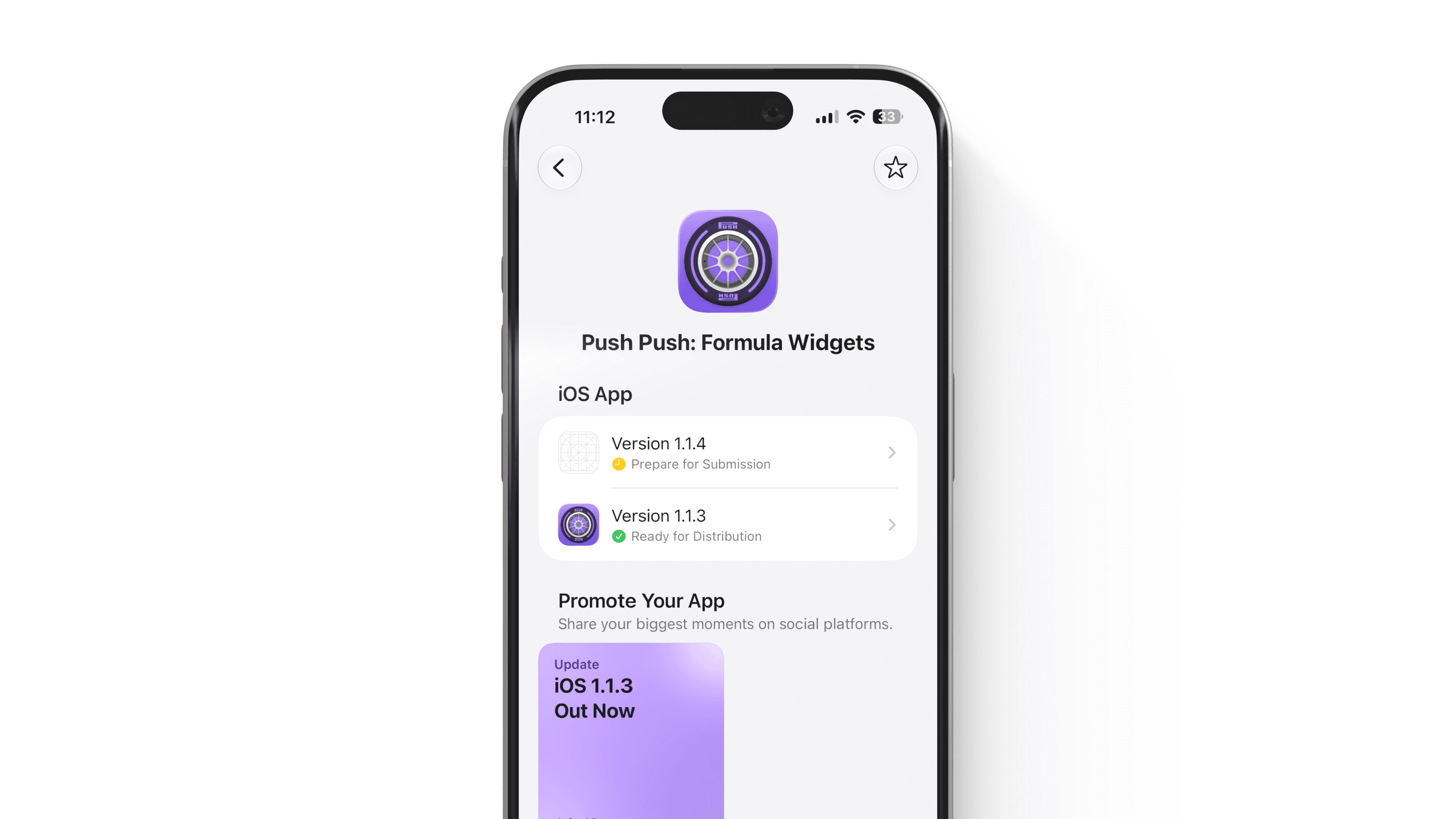
Yes. Apple offers an App Store Connect app for iPhone and iPad.
The mobile app doesn’t replace every part of the website, but you can use it to monitor app status, manage submissions, work with TestFlight builds and testers, view performance and sales, receive notifications, and respond to customer reviews.
It’s especially useful when you’re waiting for an app to move through review or want to keep an eye on a new release.
You can download the App Store Connect app from the App Store.
Frequently asked questions
Is App Store Connect the same as Xcode?
No. Xcode is Apple’s development environment for writing, building, running, and testing apps.
App Store Connect manages your app’s distribution and App Store presence. You upload a compiled build from Xcode or another development tool, then select and submit that build through App Store Connect.
Do I need to pay for App Store Connect?
App Store Connect doesn’t have a separate subscription fee, but you generally need a paid Apple Developer Program membership to publish apps, distribute TestFlight builds, and use its App Store distribution features.
As of 2026, the standard Apple Developer Program membership is $99 per year in the United States.
Can I use App Store Connect before my app is live?
Yes. You’ll use App Store Connect before launch to create the app record, prepare the product page, upload builds, run TestFlight betas, configure purchases, and submit the app for review.
Is TestFlight the same as App Store Connect?
No. TestFlight is Apple’s system for installing and testing beta apps.
App Store Connect is the larger management platform where you upload builds, create tester groups, invite TestFlight users, review feedback, and manage the rest of your App Store presence.
Can someone else manage my app in App Store Connect?
Yes. The Account Holder or an Admin can invite other users and assign roles.
Permissions can be limited based on the person’s responsibilities. You could give a developer access to builds, a marketer access to product-page information, or a support person access to customer reviews.
The bottom line
App Store Connect is the command center for your app once you’re ready to distribute it.
It’s where you create your App Store listing, upload and select builds, submit your app for review, manage TestFlight, configure purchases, track performance, respond to reviews, and release future updates.
You don’t need to understand every section on your first day. Start with the basic publishing flow:
Join the Apple Developer Program.
Create your app record.
Upload a tested build.
Complete your product-page information.
Run a TestFlight beta.
Submit the app to App Review.
Once your app is live, return to App Store Connect regularly to learn from your analytics, monitor reviews, and improve each new version.
Try Bitrig
When you’re ready to build and publish your first app, Bitrig helps new developers create native Swift apps with AI. Bitrig can also handle most of the App Store Connect workflow, including creating your app record, uploading builds, managing your listing, and submitting the app for review. Try it today.
Topics
App Store
Publishing
Testing

