Guides

In brief
Why do AI coding agents get worse over time? Learn how context windows, context rot, and compaction work, plus simple ways to keep sessions focused longer.
Have you ever started an AI coding session where everything was going great, only to notice that an hour later the agent was forgetting instructions, repeating work, or suggesting things you already ruled out?
There are a few reasons this can happen, but one of the most important is the AI context window.
A context window is the amount of information a large language model (LLM) can consider at one time. As you work with an AI coding agent, that window fills with your messages, the agent's responses, project instructions, code, files, tool results, and other information it needs to complete the task.
As that context becomes larger and harder to manage, the model can have trouble recalling and prioritizing the right information. This degradation is commonly called context rot.
AI tools use techniques such as compaction to manage this problem. Compaction reduces the amount of context being carried forward while trying to preserve the information needed to continue working. It helps, but it doesn't mean you can ignore context forever.
Understanding how all three concepts work can make you much more effective when building apps with AI.
What is an AI context window?
Think of the context window as the AI model's working memory.
It's not everything the model has ever learned. Instead, it's the information available to the model while it's generating its next response.
For an AI coding agent, that context can include:
Your prompts
Previous AI responses
System and project instructions
Source code
Files the agent has opened
Build errors
Search results
Tool calls and their results
Images and documents
What are tokens?
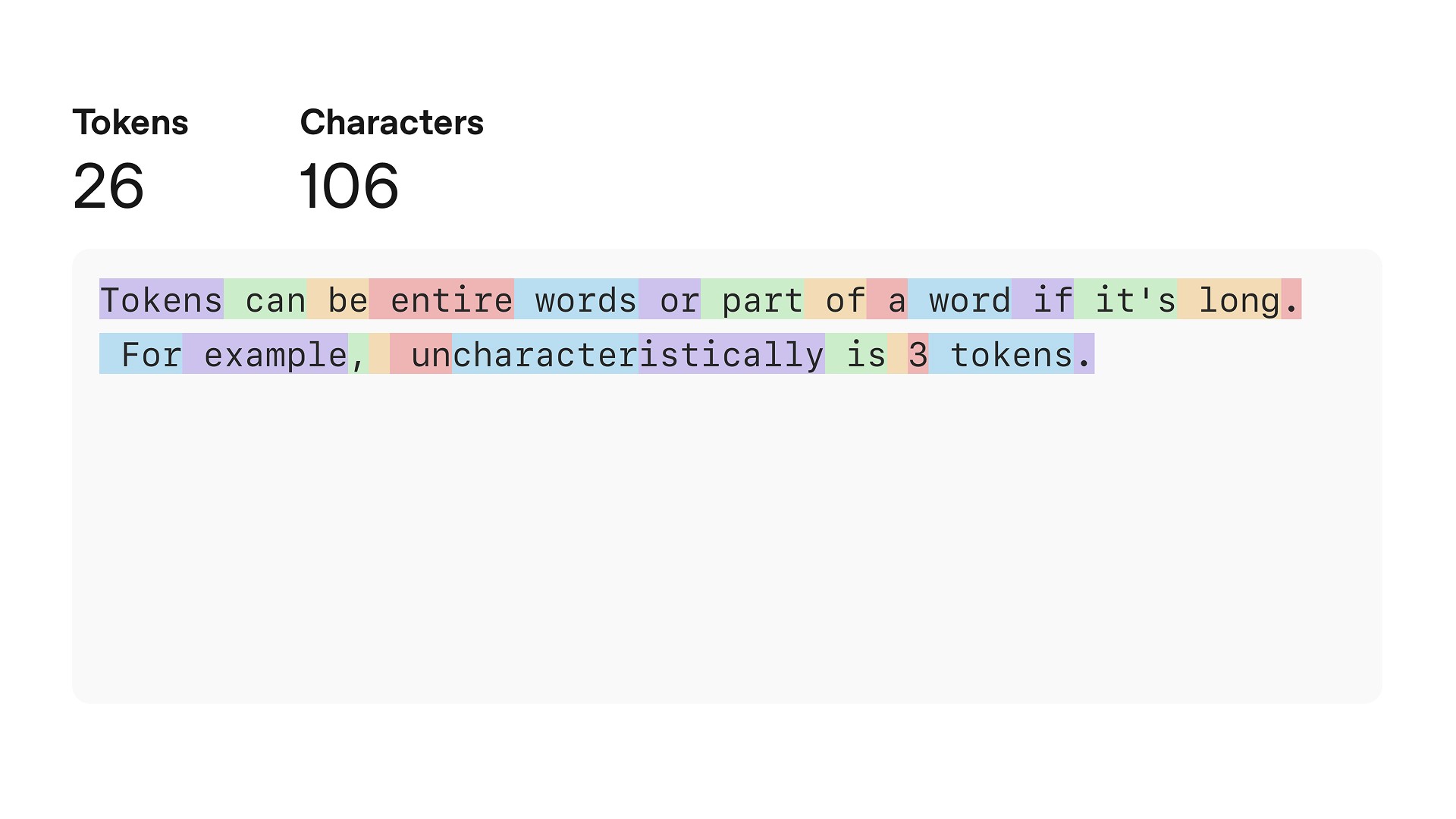
Context windows are measured in tokens, not words.
A token is a small sequence of characters processed by the language model. A token may represent an entire short word, part of a longer word, punctuation, or another piece of text. OpenAI's tokenizer documentation gives a rough rule of thumb of about four characters per token for common English text. You can try it yourself in OpenAI's tokenizer.
So when you hear that a model has a large context window, that number describes how many tokens it can work with, not how many messages you can send.
Coding agents can burn through those tokens surprisingly quickly. A giant build log, a few large source files, several searches, and dozens of tool calls… it can add up quick.
What is context rot?
Context rot is the tendency for an AI model's recall and performance to degrade as the amount of information in its context grows.
This isn't simply another name for "the context window is full."
A model can experience context rot before it hits its maximum context limit. As token count increases, accuracy and recall can decline, even though the information technically remains inside the context window.
Imagine trying to find one important sentence in a five-page document compared with finding that same sentence somewhere inside a 2,000-page binder.
The sentence is still there, it's just a lot harder to find.
What causes context to become noisy?
When you're building an app, you aren't filling the context window only with perfectly relevant source code. The agent may also accumulate:
Old terminal output
Build logs
Search results
Outdated implementations
Failed approaches
Long tool responses
Earlier conversations about unrelated parts of the project
That doesn't mean terminal output or tool results are automatically junk. Some of them may be critical at the moment they're produced.
The problem is that their usefulness can decrease as the task changes.
A 300-line compiler error might be extremely useful while fixing a build. Twenty minutes later, after the problem has been solved, carrying all 300 lines forward may not be that useful.
Good context isn't necessarily the most context. It's the most useful context for the task at hand.
Context engineering is the practice of deliberately curating and maintaining the information available to the model so the most useful instructions, files, tool results, and conversation history stay available while unnecessary noise is minimized.
Context engineering means thinking beyond the prompt itself. You're optimizing which files the agent reads, what tool output gets added to the conversation, which instructions should persist across sessions, and when it makes sense to compact the context or start fresh.
This is a skill you'll learn with time.
What does context rot look like while coding?
You'll notice changes in the agent's behavior. Common warning signs include:
Forgetting a requirement you previously discussed
Recommending an approach you already rejected
Repeating work it completed earlier
Changing established naming conventions
Ignoring part of the project's architecture
Becoming strangely confident about something that doesn't match your project
None of those behaviors automatically prove context rot is the cause. AI agents can make mistakes for plenty of reasons.
But if the session has become very long and the agent suddenly seems less grounded in your project, context rot is the likely culprit.
What is context compaction?
Eventually, a long-running AI session will approach the model's context limit. One solution is compaction.
Compaction makes the model's working context smaller while trying to keep the parts it will need later. The exact implementation depends on the tool.
Does compaction lose information?
This is where an important tradeoff comes in.
Compaction is designed to preserve useful state with as little degradation as possible. It should not be thought of as randomly throwing away half your conversation. The tools are getting pretty good at retaining things like the current goal, decisions, constraints, progress, and other information needed to continue.
But a compacted representation is still not the same thing as keeping every original token available exactly as it appeared.
A small detail that seemed unimportant to the model during compaction may turn out to be a big deal to you.
Imagine that 30 minutes ago you told your coding agent:
This project uses
@Observable. Don't use Combine orObservableObject.
That might be a very important architectural constraint to you. In a long session, you don't want this detail to depend entirely on that one sentence surviving context compaction.
This is why important project requirements should live somewhere more durable than the chat. More on that later.
What about repeated compaction?
It's tempting to describe repeated compaction as a "summary of a summary of a summary." That's a useful mental model, but it isn't exactly how these tools implement compaction.
Repeated compaction doesn't automatically mean your session becomes unusable. Modern tools are designed to preserve continuation state across long-running work.
However, the practical concern is the longer you depend entirely on conversational history, the more you're trusting the agent's context-management system to continue carrying every important detail forward.
After a while, that risk grows. That's a great reason to externalize important information.
Context rot vs. compaction vs. a new thread
Concept | What it means | Main benefit | Main drawback |
|---|---|---|---|
Context rot | Recall or performance can decline as context becomes larger and harder to prioritize | None, it's a problem to manage | Important information may become harder for the model to use |
Compaction | Older context is reduced into a smaller representation | Frees space while preserving continuity | Some nuance may no longer be represented exactly as before |
New thread | You start with fresh context | Removes accumulated noise | You must give the new session enough information to continue |
The important takeaway is that compaction and starting fresh solve different problems. Compaction prioritizes continuity. A new thread prioritizes a clean context.
How to prevent context rot while AI coding
1. Start new threads at natural boundaries
You don't need one enormous conversation for your entire app. Starting a new feature? That's a great opportunity for a new thread. Finished authentication and moving on to notifications? Consider starting fresh.
Halfway through a large feature but you've just reached a major milestone? That may also be a good stopping point.
Give the new agent a concise handoff explaining the goal, current state, important constraints, and what should happen next.

2. Create durable sources of truth with AGENTS.md and CLAUDE.md
One of the best ways to protect important project details from context rot or compaction is to move them out of the conversation and into files the coding agent can read again later.
AGENTS.md and CLAUDE.md are repository instruction files that give AI coding agents persistent project guidance across sessions. Codex automatically reads applicable AGENTS.md files when it starts, while Claude Code reads CLAUDE.md files at the start of each conversation.
These files are good places for information you don't want to depend on the chat remembering, such as:
Project architecture
Build and test commands
Coding conventions
Important constraints and "do not" rules
How to verify that the work is complete
You can also keep larger project requirements, feature specifications, architecture documents, or implementation plans alongside them. The goal is the same. Create durable sources of truth the agent can return to instead of relying on a compressed memory of a long conversation.
Keep these files focused. Since their instructions become part of the agent's context, you don't want to turn them into giant project encyclopedias filled with information the agent rarely needs.
3. Keep the context high-signal
Don't dump enormous amounts of information into an agent just because you can.
More context isn't automatically better.
When possible:
Ask tools for targeted output.
Avoid pasting gigantic logs when the useful error is 20 lines.
Keep unrelated tasks in separate conversations.
Point the agent toward the files relevant to the task.
Ideally, you're minimizing the fluff in the context window and maximizing the useful information.
4. Restate critical constraints before major changes
If the agent is about to perform a substantial refactor, don't assume that an important instruction from 50 messages ago is still being prioritized correctly.
Restate it.
You can also ask:
Before making this change, summarize your understanding of the current architecture, constraints, and approach.
If something important is missing, you can catch it before the agent changes your code.
5. Use manual compaction intentionally
Some coding agents let you trigger compaction yourself.
As of August 2026, Codex supports the /compact command, which compacts the current chat's context when you want to. This way you don't have to wait for the context window to approach its limit before compaction.
Manual compaction can make sense after a noisy phase of work or at a clean milestone.
But don't compact simply because the button or command exists. You're deliberately reducing the active context. If the session is focused and working well, there's no reason to do it.
Does a bigger context window solve the problem?
Not completely.
A larger context window gives the agent more room, which is useful. But it doesn't guarantee that every piece of information inside that window will be recalled or prioritized equally well.
That's the core idea behind context rot.
A massive context window full of stale logs, old implementations, irrelevant conversations, and conflicting instructions is going to be less useful than a smaller, carefully curated context containing exactly what the agent needs.
Context quality matters.
Frequently asked questions
Is context rot the same as filling the context window?
No. A context window is the model's capacity. Context rot describes declining recall or performance as the amount of context increases. Context rot can appear before the window reaches its maximum size.
Does compaction completely erase the old conversation?
Not necessarily. Implementations differ. Most tools can carry forward compacted state and retain selected items from the previous context window. The goal is to preserve enough state for the work to continue while reducing token usage.
Should I start a new AI coding session for every task?
Not every tiny change needs a separate thread. A useful rule is to create a new thread when you're moving to a meaningfully different task or when the existing conversation has become long and cluttered.
Is AGENTS.md or CLAUDE.md part of the context window?
Yes, when they're loaded. When Codex loads an applicable AGENTS.md file or Claude Code loads a CLAUDE.md file, those instructions become part of the information available to the model and consume context like other instructions.
Their advantage is durability. The file stays in your project and can be loaded again in a future session instead of existing only inside one conversation. That makes important project rules much less dependent on surviving a long chat or context compaction.
The bottom line
An AI context window is the working set of information available to a model while it responds. As that context grows, the model can have more difficulty finding and prioritizing the information that matters, a phenomenon known as context rot. Compaction helps by reducing the active context while preserving important state, but it isn't a replacement for good context management.
For developers, the practical solution is simple: keep conversations focused, start fresh threads when the work changes, keep important requirements in durable project files, and don't rely on one enormous AI conversation to remember your entire app forever.

Try Bitrig
If you're just getting started building apps with AI, Bitrig specializes in building high-quality, premium, native Swift and SwiftUI apps for Apple platforms. It also can take care of App Store Connect for you so you can ship to the App Store fast and easy.
Topics
Developer Workflow
AI Coding
Under the Hood